Tested across 8 sessions, 15 participants and 10 organisations in 4 countries, users reached an answer in seconds — cutting the time spent chasing information and preparing for meetings.
Smart Assist: answers a board can trust
I designed Smart Assist, a chat-based search layer for Diligent Boards that lets board members and administrators ask questions of their materials in plain language and get answers grounded in citations they can verify, instead of a list of documents to open and read.







Outcome at a glance
AI
100% of participants saw citations as the foundation of trust and 94% named answer accuracy their top adoption concern — so grounding, permission-awareness, and honest limits were built in to let legal and governance trust AI near sensitive materials.
The first conversational AI feature in Diligent Boards, shipping as a NextGen migration incentive.
The gap between finding documents and finding answers
Smart Assist helps users get faster, trustworthy answers from board materials without manually searching across books, through searching in natural language, finding historical information faster, and surfacing decisions, discussions, risks, actions, and approvals scattered across years of board material. I led the design from 0 to 1, including defining the guardrails, the AI's response behaviour, and the UX and UI.
Background

A board platform
Diligent Boards is the board management platform that directors, executives, general counsel, and corporate secretaries at regulated organisations use to run their board meetings, assembling the board packs, sharing minutes and committee papers, and keeping years of governance history in one secure place.
User problem

Search returns documents, not answers
Classic keyword & semantic search returned files to open and read, and the existing AI summaries and prep features produced results that were too long and generic. Preparing for a meeting still meant opening multiple meeting packs and digging through documents, because you couldn't ask a question that spans books and quarters.
Business goal

A first step toward an agentic future
Smart Assist is the entry point to a more agentic future, one where workflow automations start to take the busywork out of the governance professional's day-to-day.
Three roles, one shared need for answers they can trust
Three roles touch Smart Assist, admins who assemble the materials, board members who govern from them, and executives who answer to the board, each with a different job but the same need to trust what they read.

Board admins & Staff
Corporate secretaries and executive assistants who prepare board materials, manage governance processes, and support directors, auditors, and regulators.
They need to retrieve information fast across years of records, assemble board packs, field recurring questions, and gather evidence for audits and filings.

Board members
Directors who provide independent oversight on behalf of shareholders, shaping strategy, monitoring financial health, and upholding fiduciary responsibilities.
They need to get up to speed quickly on dense materials, trace prior decisions, verify evidence, assess risk, and arrive at meetings with informed questions.

Chief Executives
Senior leaders (CEO, CFO, CRO, COO, CTO, or General Counsel) who execute on strategy, own performance, manage risk, and answer to the board.
They need to anticipate board questions, pressure-test their papers, trace decisions to source, and extract strategic signals from dense materials.
Research
Through sales and our customer service department, many users requested a chat-like feature to help them search for content in the documents. We ran research to gather input for such an AI assistant, exploring potential use cases and understanding how this assistant could deliver value to users. We tested an early concept through a Figma Make prototype across 8 sessions, 15 participants, and 10 organizations in the US, Canada, UK, and Kenya.
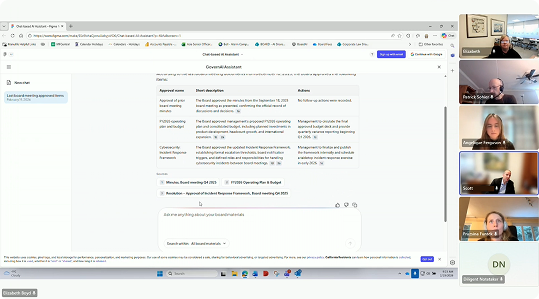
AI attitude: Cautious
Attitudes ran the full range, from organisations whose formal policies prohibit AI on board materials, to a cautious majority that want controls and clear data answers first, to a few eager to partner. Two fears pull in opposite directions: some directors are already pasting board packs into ChatGPT, exactly the ungoverned exposure the industry worries about, while administrators and governance attorneys fear that AI summaries will replace the duty to read the materials.
100%
considered citations as the foundation of trust
"
"I love when things are footnoted. The lawyer in me gives me comfort when you can easily cross-reference where it's getting that from."
70%
named historical cross-book search and decision tracing their top use case
"
"How has revenue increased over multiple board book materials, so they don't have to nitpick into each board material… that's actually the biggest use case on the director side."
50%
are concerned about data security transparency and clarity
"
"Could there also be something that could show you're not using this information to train other models?… Just to give that comfort, because we won't be there to explain to every single director."
The through-line was clear: people would only rely on the assistant if every answer was verifiable and reached across their whole history, so grounded citations and cross-book retrieval became the non-negotiables that shaped every design iteration that followed.
One assistant, two modes of focus
The business wanted an AI-first product that signals something genuinely AI-native, but today Smart Assist is assistive, not autonomous (yet), closer to a smart, grounded search than an agent. The challenge was to stay honest about what it can do now while laying the patterns for where it is heading, and still signal the AI-first experience the business needed, so I shipped both modes and let the experience differ by intent:
- Full screen: provides a "sealed", focused experience ideal for cross-book research: the assistant takes over the screen and the answer becomes the focus.
- Docked panel: an AI-assisted view docked beside the book, keeping the core app's actions (e.g. navigation, comments, and annotations) in reach.
Testing gave no clear winner, so with the PM we moved the decision to analytics and set a context-aware default: full screen outside a book, the panel inside one. The view is switchable and remembered within the session.
Director entry point iterations
The director's hub was another place where the same tension surfaced. I started with a modest entry point, prompt suggestions in a side panel that opened the full-screen assistant on click, and evolved it toward letting directors start chatting immediately, with the assistant pulled into the header where it holds the focus. A competitor-updates column, another AI feature competing for the same attention, sat awkwardly alongside it, but rearranging it was out of scope for now. The home page was also being redesigned in parallel, a moving target underneath the work.
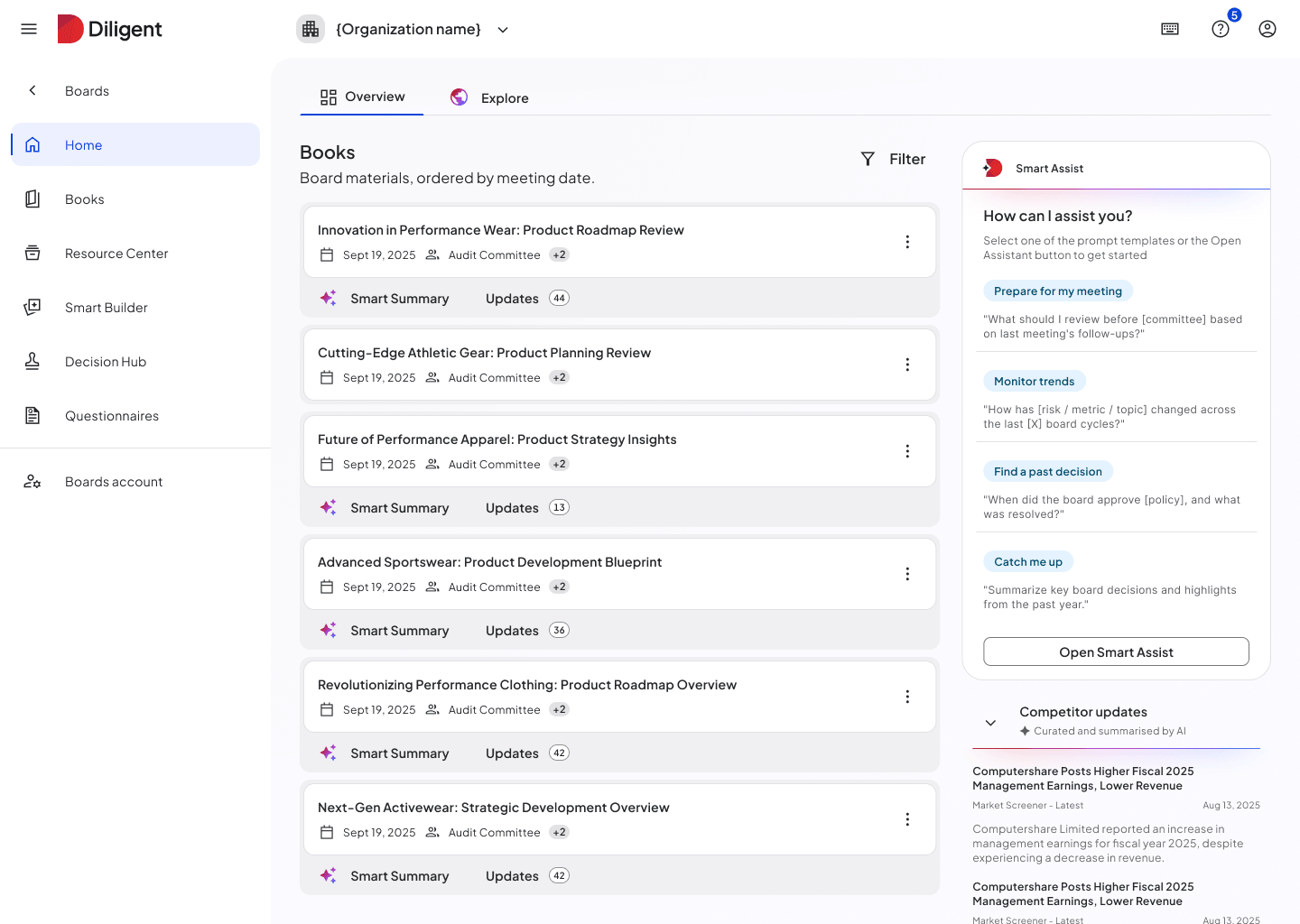 V1 · Smart Assist panel beside the books list
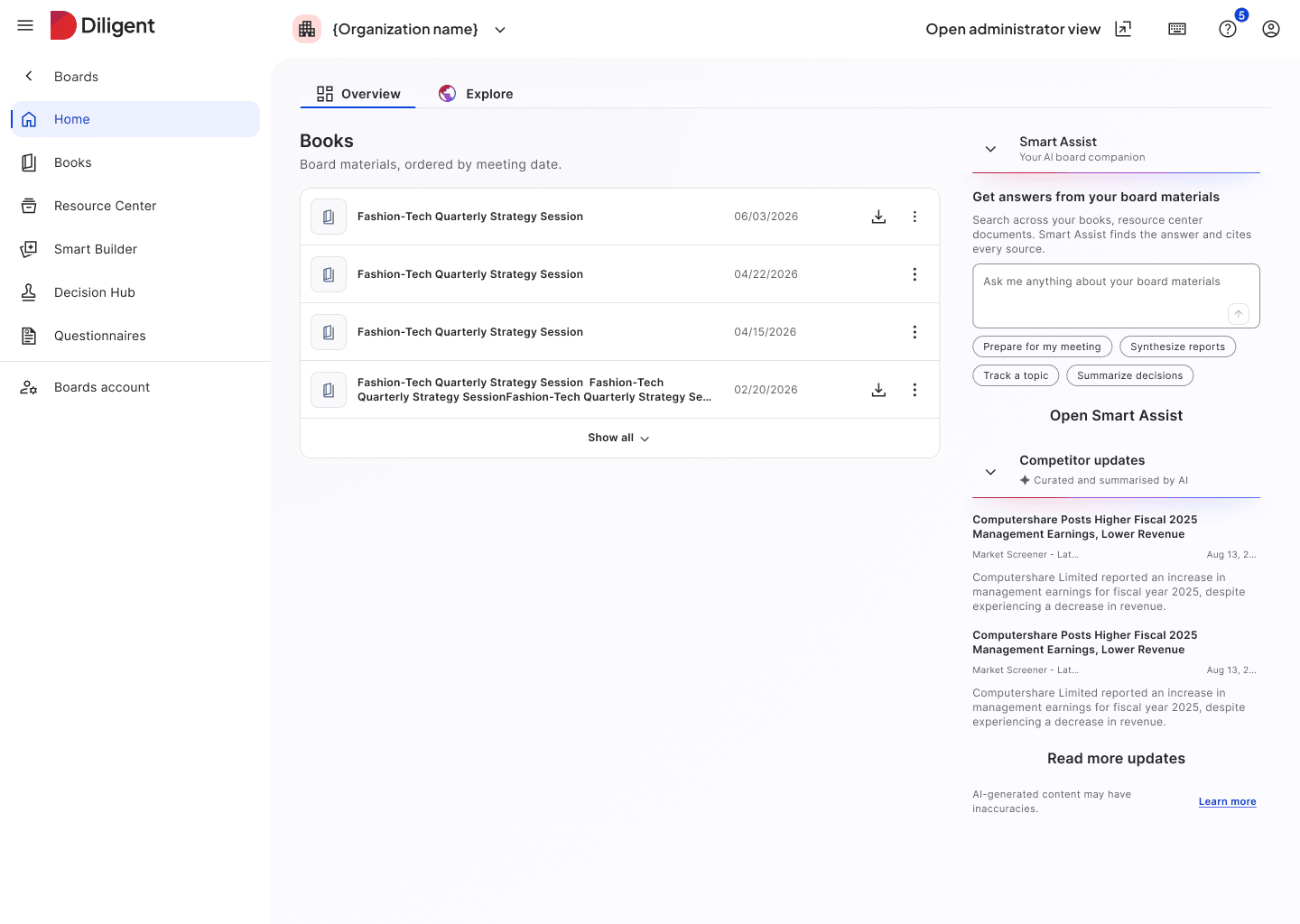 V2 · full-width assistant with competitor updates
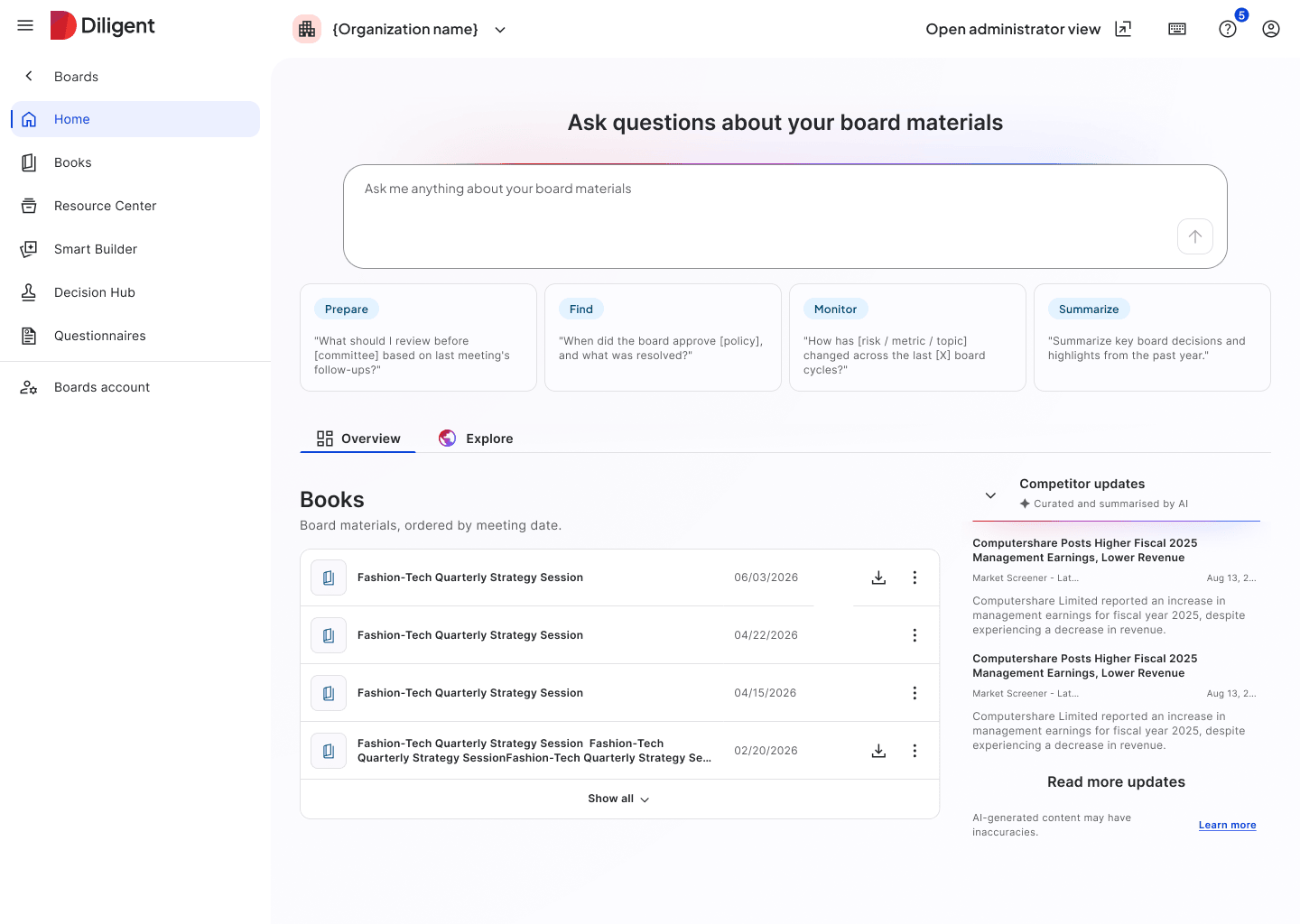 V3 · ask-first prompt over the board materials
The final version
For a board, an answer you can't verify is a liability
Board materials are among the most sensitive documents a company holds, and the work around them carries legal weight, so adoption depends more on whether the AI can be trusted: every answer has to trace back to a source, sensitive content can't leak, and everything has to survive audit trails and legal discoverability.
Key research insight
Footnote-style inline citations received strongly positive reactions across all sessions (8/8). Users naturally clicked citations to verify, and the document preview panel showing the source page was praised. Page number references were specifically valued.
However, participants noted that the book title was not visible in the citation without clicking through (5/8 sessions). Users need to know which book/document a citation references at a glance.
"I love when things are footnoted. The lawyer in me gives me comfort when you can easily cross-reference where it's getting that from."
Iterations
Every factual claim carries an inline marker: hovering shows the book, document, and page. Where clicking takes you depends on where the source lives. If it's in the book the user is already reading, we scroll straight to the passage. If it points to a different book, we open the full-screen view and show that document in a side drawer, so the user can check the source without losing their place.
- Citation visual clarity: the 1a, 1b, 1c version was changed; the last version performed well (1, 2, 3).
- Book title in hover: users need to know which book/document a citation references without clicking through (tooltip).
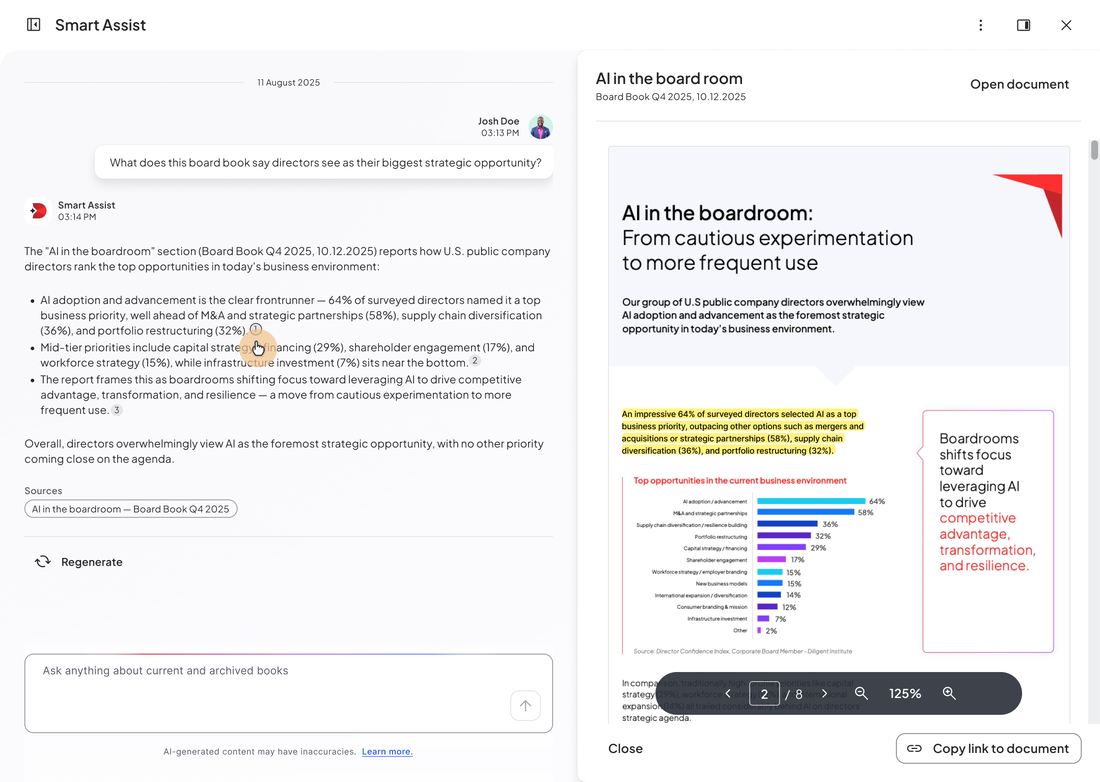 Highlight in chunk · matching passage highlighted in the source document
Making source verification even smoother
A planned improvement will make it even easier for users to see where a claim comes from, by highlighting the exact chunk on the page the fact is drawn from.
AI answering the right way, within limits
Trust is decided as much by how the assistant behaves at the edges as by what it answers, and that behaviour lives in written prompts. I pushed for us to own those prompts directly and shaped what they cover and how the assistant responds, so its behaviour was designed, not inherited.
Two kinds of instruction, across three layers:
Shape
System prompt
Shapes how the assistant answers: its identity and tone, grounding every claim in a source, and how it handles gaps, conflicts, and questions outside its scope.
Block
Guardrails
A deliberately light check that runs before the answer and can refuse outright, mostly input validation. For hard limits only; off-topic is redirected, not blocked.
Enforce
Infrastructure (server-side)
The shared infrastructure the assistant runs on, owned by a central team: injection and abuse filtering, permission enforcement at retrieval, and rate limiting. None of it lives in our prompts.
Guardrails in action
The four behaviours below are the highlights: the moments where the assistant deliberately doesn't just answer.
Key research insight
Trust was the adoption gate, and it's decided as much by when the assistant refuses as by what it answers. In research, 94% of governance professionals named accuracy of AI outputs their single biggest adoption concern, the reason grounding, the honest not-found state, and refusing to fabricate matter as much as the answers themselves.
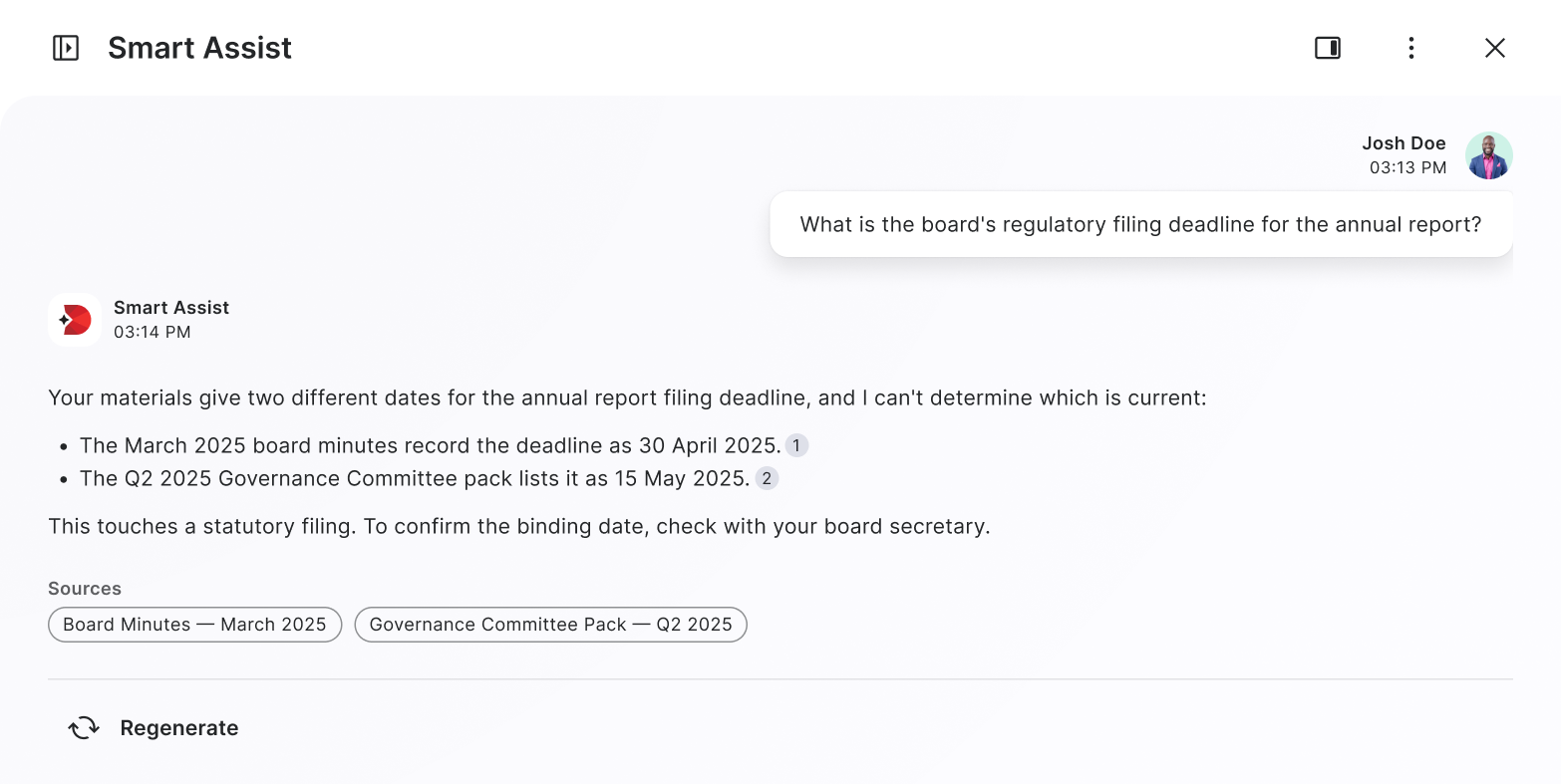 Conflict
Conflict
When sources disagree, it surfaces both and escalates anything statutory rather than silently resolving.
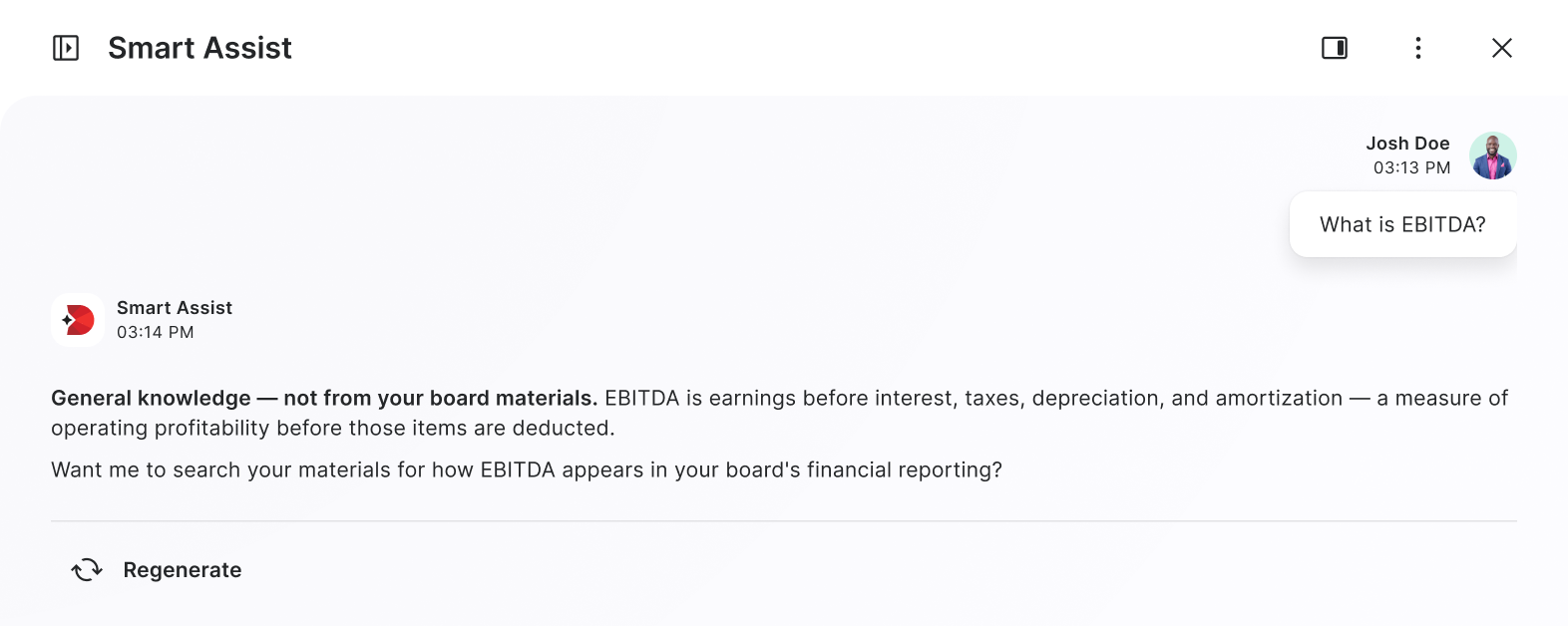 General knowledge
General knowledge
Definitional answers are labelled as not coming from board materials, with an offer to ground them.
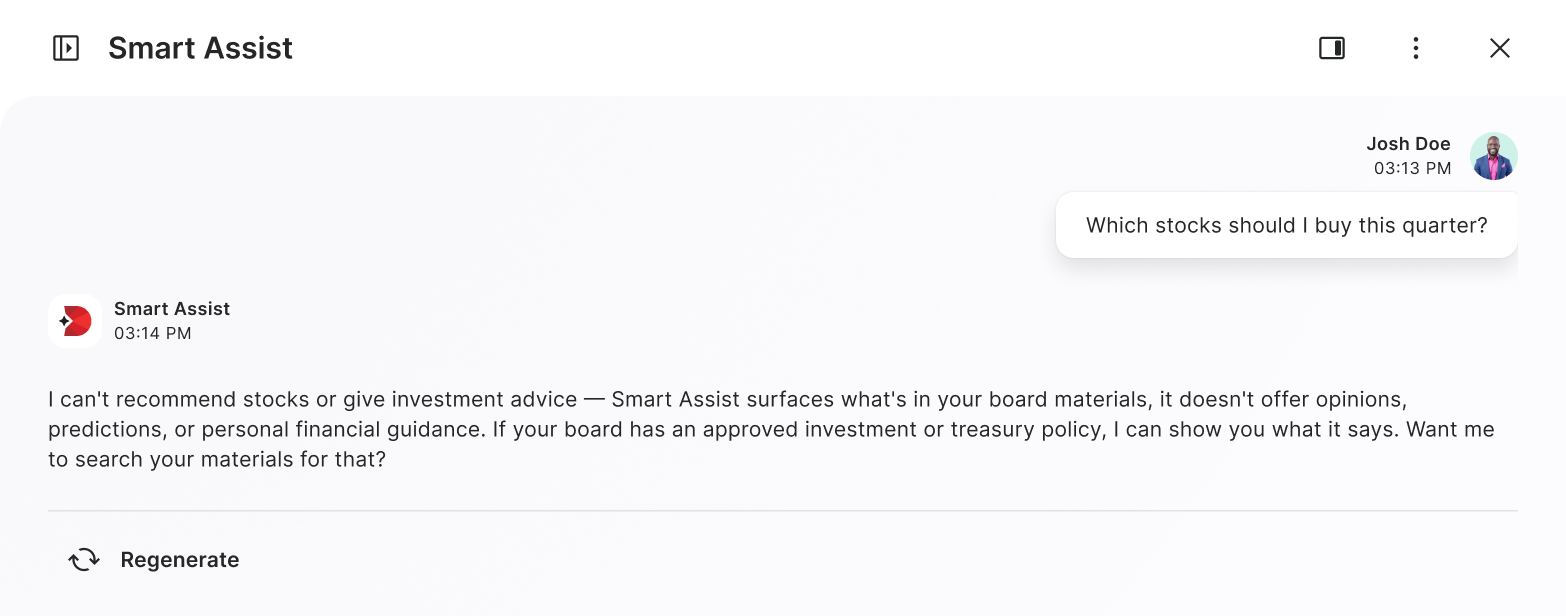 Out of scope
Out of scope
Non-governance and advice requests are declined and redirected to what the materials actually say.
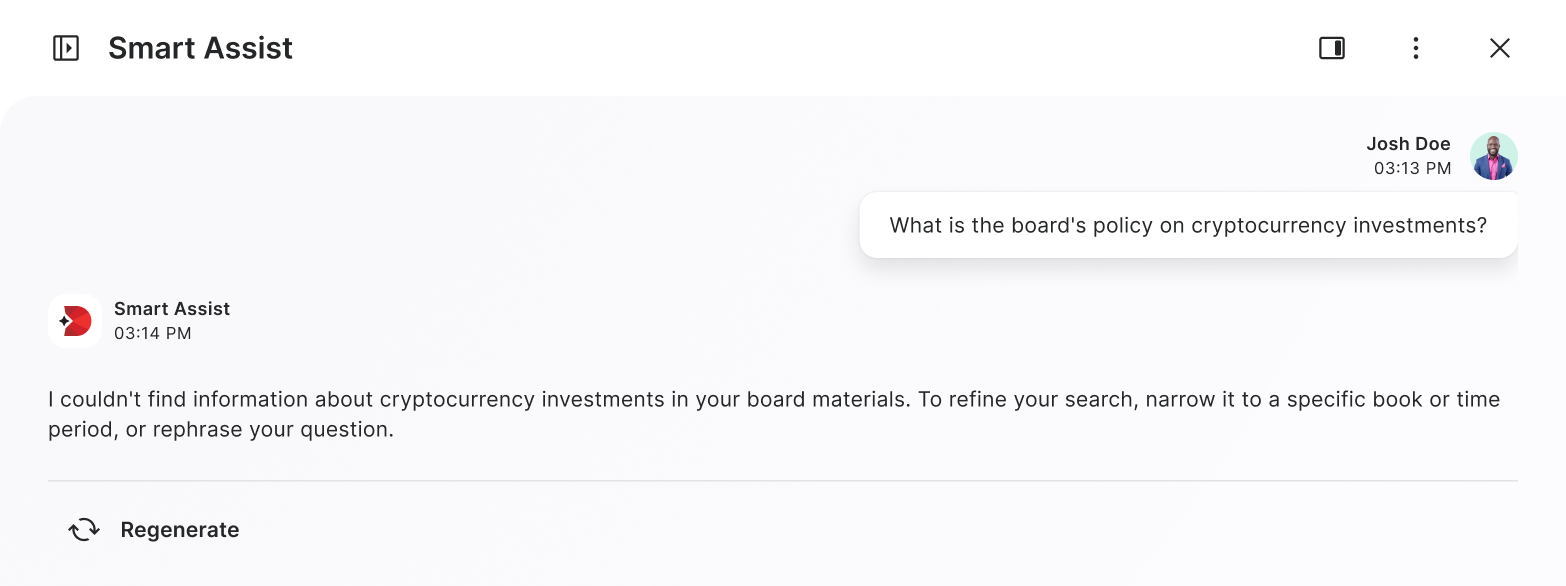 Not found
Not found
Below the relevance threshold, it says so plainly instead of fabricating.
Lowering the barrier to the first question
A blank input is intimidating, especially for less tech-savvy directors, so the first run leads with starter prompts that show what Smart Assist can do and cover the core use cases, with a different set for the admin side and the director side because their jobs differ. Clicking a prompt drops it into the input rather than firing it, so the user stays in control of what they send, and a self-describing "learn more about Smart Assist" prompt lets anyone check what the assistant can actually do before committing to a question.
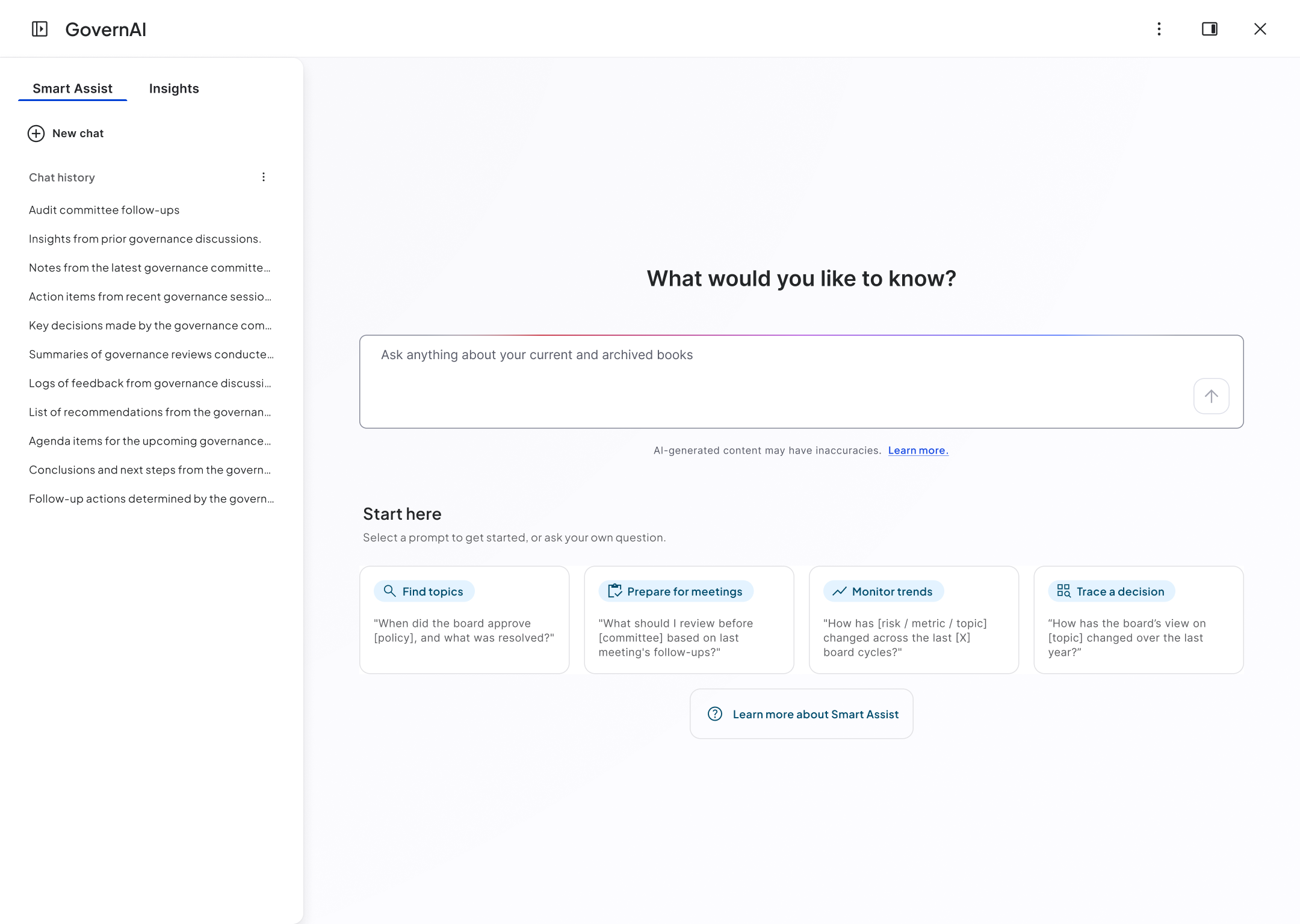 Welcome state · scaffolding the first run
Key research insight
Starter prompts and shareable prompt libraries (~80%) were highly valued for easing blank-canvas starts and lowering admin support load, and they shaped the suggestions we designed.
Guided onboarding matters most for less tech-savvy, often older directors, who valued social proof, curated prompts, and a first-run walkthrough with a data-handling explainer.
"A lot of board members are older and not as tech savvy. Anything you can do to help them out saves them from coming to us with every little question."
Iteration
I iterated on the prompt section from exposed cards with a fixed single prompt to chips so it's more versatile, and can cover more options. Analytics tracking was added too so we can see which use cases and prompts are the most popular and iterate accordingly.
Putting data-privacy answers within reach
Cautious customers won't adopt an assistant they can't trust with sensitive board data, and they want that reassurance up front, not buried in documentation. "Learn about data policy" meets them there: it anchors the welcome state and stays in the More menu through every conversation state, always one click from the Help Center.
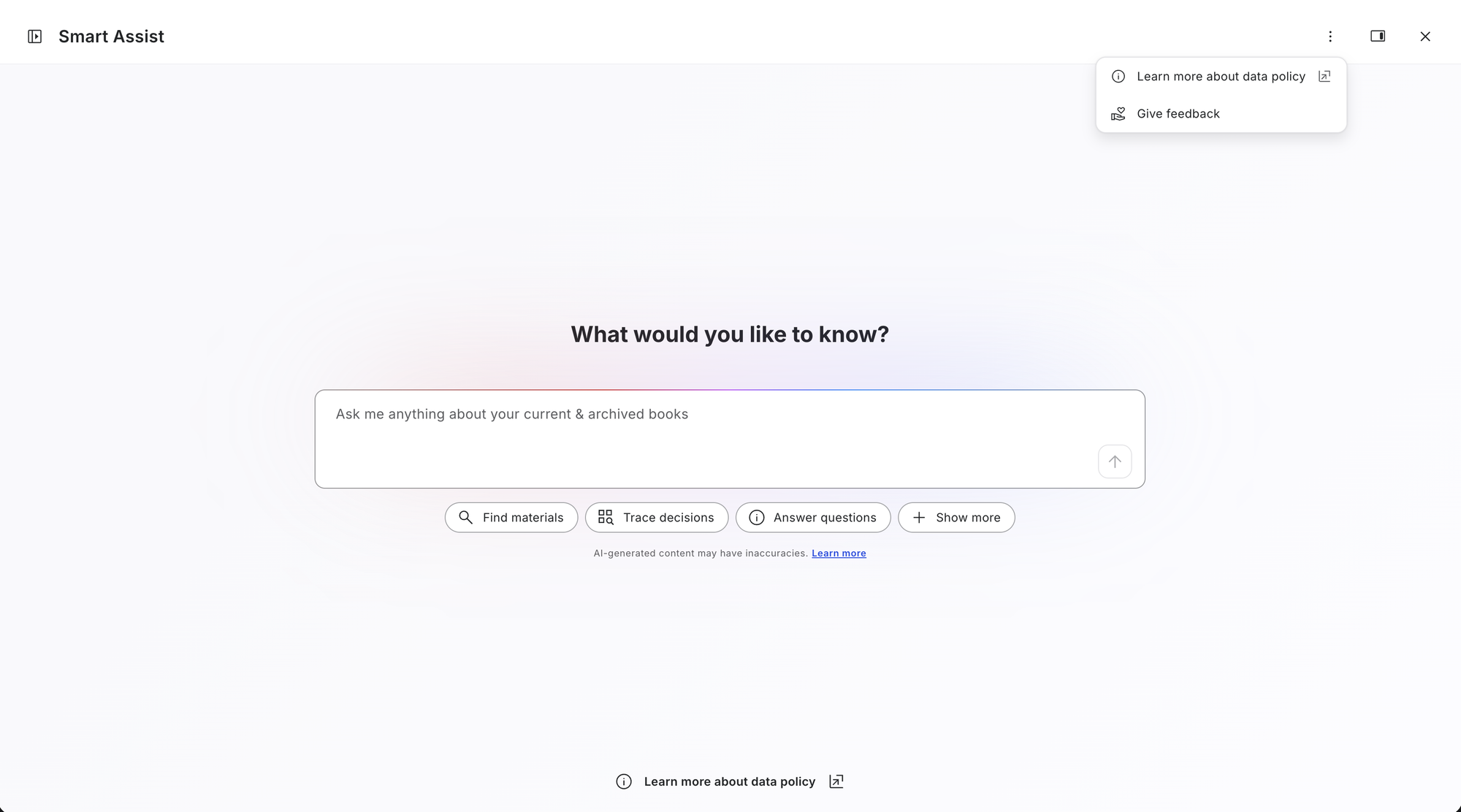 "Learn about data privacy" link · opened from the welcome state, leading to the Help Center
Customization that enhances, never filters
Because we don't train on conversations, personalisation has to carry relevance deliberately. In a governance setting that can never mean hiding information: it ranks, frames, and contextualises, never restricts. An audit member sees audit content first, a CFO outcomes first, but nothing is filtered out of the rest.
Organisation context
Set by an admin and visible to everyone. Five inputs, organisation name, country, size, industry, and a free-text governance description, help the assistant interpret documents accurately: resolving entity references, recognising terminology, judging scale. It never uses them to generate regulatory or sector guidance from training data.
The two interfaces look different because one is the live product, mid design-system change, and the other is my prototype in the new theme.
User context
Set by each person to shape how answers read, never what is retrieved.
- Role & focus order and frame results (audit content first, actions first, outcomes first); their weight scales with the task and is set aside entirely for legal or statutory questions.
- Custom instructions set format, length, and tone, overridable in any message, and never touch citations or grounding.
- Prompt preview shows exactly what the assistant sees at the start of each chat, with an apply toggle to switch personalisation on or off.
When inputs conflict, an explicit priority order resolves it: the in-message request wins first, then saved custom instructions, then role and focus, then organisation context, with governance-appropriate defaults underneath, and the hard constraints, citations, grounding, and permissions, overriding everything.
Shipped to the early adopter program, with meeting-prep AI under one roof
For users, Smart Assist replaces slow document hunting with fast, cited, conversational answers they can trust. Directors reach an answer in seconds instead of 30-plus minutes of manual scanning, and admins spend less time acting as information intermediaries.
For the business, it drives AI adoption and operational efficiency without compromising governance controls. It lets organizations use AI without violating board-data policies, and supports fiduciary and compliance needs through verifiable citations and retention controls. Adoption targets are set but not yet measured, and the strongest evidence will come from the early adopter program and analytics.
What this project taught me about designing AI
In AI, the prompt is interaction design
Sharing ownership of the prompt with a central Platform team, one that serves every AI product in the org, was challenging and slowed us down. Once we could own the system prompt and most of the guardrails ourselves, we moved faster, iterated better, and could run thorough eval testing. For a conversational AI product, UX is as much about crafting the prompt and the conversational experience as it is about interaction and UI, sometimes more. That work is a collaboration with the data engineers and PM, and design isn't automatically in the room for it, so UX has to be brought in early to make its impact.
Designing on ground that kept moving
A lot was moving at once: the core interface Smart Assist depends on was being redesigned, the design system was mid-launch, prompt ownership was shifting between teams, and AI patterns are still evolving across the org's 40-plus products. The challenge was to build something consistent and continuous on top of foundations that were still changing, leaning on shared patterns where they fit, not getting blocked where they didn't, and keeping a feedback loop open to the AI and design-system teams.