The three capabilities closed the gap that had blocked SFS from running the client's transaction rooms, and the contract closed before their existing VDR vendor's renewal.
Evolving Secure File Sharing toward a Virtual Data Room solution
I led the design of three interconnected features that helped Diligent win major enterprise clients and expand Secure File Sharing into high-value, confidential transaction use cases.
Outcome at a glance
Data-room controls SFS can now package and position as a standalone VDR proposition for future enterprise clients.
A legal access gate, room-wide update notifications, and concealed identities, built as a proof of concept and designed to work together under a hard deadline.
A file-sharing tool being pushed into data-room territory it was never built for
Diligent Secure File Sharing (SFS, now Diligent Data Room) is a secure tool executives, board admins, and partners use to store board materials and exchange confidential files. Built for storage and sharing, it was stretched as enterprise clients asked for the stricter controls of Virtual Data Rooms (VDRs).
User problem

The product lacked three critical, deal-breaker capabilities
Three capabilities were essential to confidentiality, compliance, and trust, and SFS had none: no legal consent or NDA gate before access, no notifications when content changed, and no way to conceal participant identities. Without them, the client's deals couldn't run on the product.
Business goal

Win the deal now, then open a new market
Deliver the essential features as a proof of concept within a tight deadline, give Sales a standalone offering for future clients, and keep the design scalable and flexible for similar enterprise use cases — all in roughly three months.
Designer reality
A very challenging project
- With shifting priorities and a hard deadline to prove SFS could meet the client's needs before renewal, six weeks covered discovery, requirements, and prototypes — forcing rapid decisions and scope cuts.
- Communication was fragmented — limited user access and slow feedback meant each meeting focused on essentials, with follow-ups over email.
- Internally, no plan existed for VDR expansion — building these features without one risked short-term fixes over a cohesive, scalable solution.
Where the data room sits in a high-stakes transaction
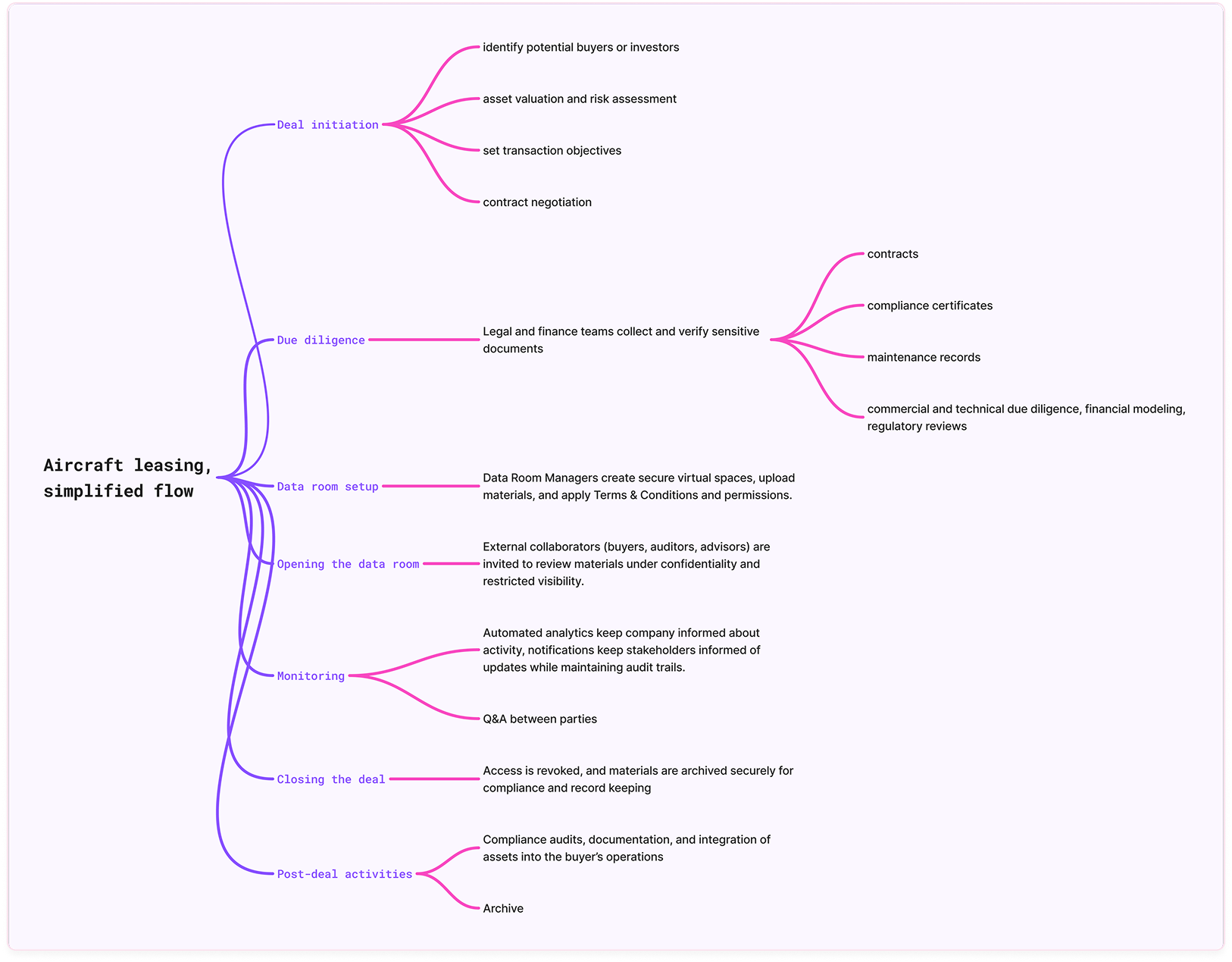
Before designing anything, I mapped the lifecycle of a typical aircraft-leasing deal — from deal initiation and due diligence through setting up and opening the data room, monitoring activity, and closing. It grounded the work: the three capabilities I designed all operate in the setup and opening stages, where confidentiality, awareness, and identity control matter most.
Who these data rooms are built for
A global leader in aircraft leasing, the client buys, leases, and sells aircraft fleets — each transaction requiring legal, financial, and technical teams to review large volumes of sensitive data under strict confidentiality and audit requirements. Their need for a secure, structured environment to manage these high-stakes exchanges directly shaped this project.
 Board admin / legal
Corporate Secretaries, Legal Ops Manager, Project lead
Focused on compliance, accuracy, and control. They manage sensitive transactions, set up secure data rooms, and make sure every participant operates under the right permissions and legal frameworks — experts in confidentiality and workflow who still keep collaboration smooth during complex deals.
 Collaborators
Analysts, Legal counsel, Advisers, Auditors
Internal and external collaborators — analysts, legal counsel, advisers, and auditors — prepare, review, and access deal materials under strict confidentiality. They value efficiency, data integrity, and a system that protects their activity while giving quick, accurate access within the room's disclosure rules.
 IT Administrator
System Administrator, IT Compliance Manager, Information Security Officer
Pragmatic and risk-aware, responsible for system stability, security, and compliance. They need solutions that integrate seamlessly with existing policies and provide clear auditability, without overcomplicating configuration or maintenance.
Designing for confidentiality and control
The client required a legal gate — a confidentiality and non-disclosure agreement every user must accept before entering a data room. The goal was a legal-consent experience that ensures compliance while staying quick and intuitive.
For data room managers
Requirements
- Add a T&C consent configuration option during setup.
- Support updating and reactivating agreements.
- Allow activation or deactivation at any time.
We placed this in the Policies section of Data Room Management, alongside other administrative safeguards. Since the client's example was a multi-paragraph legal document rather than the short text the PM expected, we switched to PDF upload for scalability.
I also pushed for an optional preview mode, so managers can check how the consent screen looks to end users before publishing.
For collaborators
A clear, minimal consent screen built for first-time access — readable and trustworthy, with confirmation feedback on agreement and a link to the full document.
Collaborators can return any time to view or download the version they accepted, right from the data room.
Keeping fast-moving deals aligned without burying users in email
After room setup, during the "opening" phase, the organisation invites collaborators (buyers, legal teams) and grants them simultaneous access to documents for due diligence or contract review. They had to know when new documents were uploaded or changed — so no one reviewed a stale version — and every change had to leave a mark in the change log for compliance, audit, and litigation. All of it without spamming a room of hundreds, or leaking a masked identity through a notification.
Requirements & approach
- Admin-controlled notifications at the group level.
- Email summaries listing file updates and uploads (excluding deletions).
- Compliance with member-visibility rules — notifications must respect masked identities.
- Reliable delivery at a limited frequency to avoid spam.
- Every change written to an activity report for audit purposes, regardless of who is notified.
We introduced configurable, group-based notifications that summarise changes and updates, delivered as concise email digests roughly every 15 minutes.
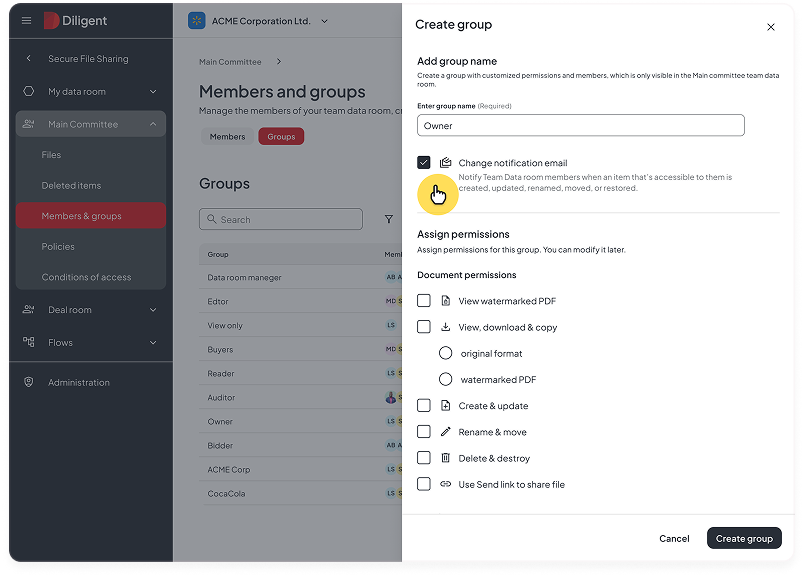 Group-level digest configuration
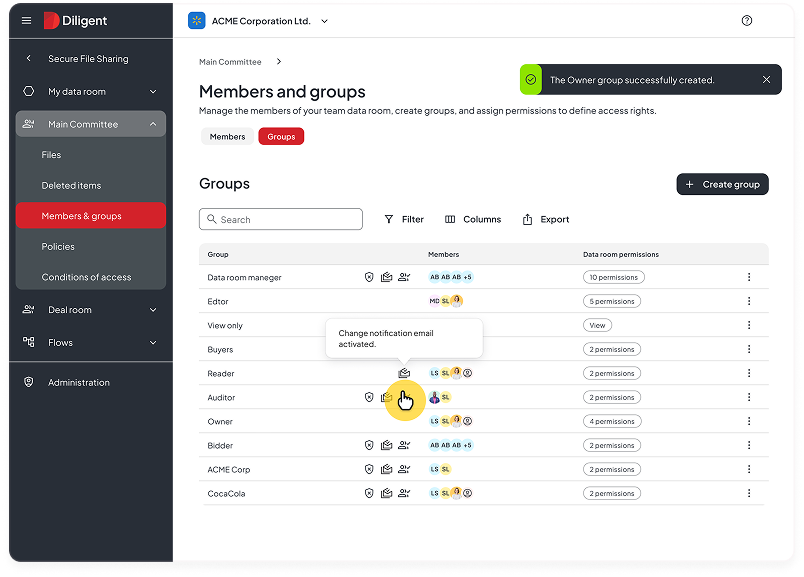 Digest email summary
Member visibility and concealed identities
This was the most complex challenge: a concealed-member capability that hides specific users or groups from each other within the same data room. In the client's world, competing buyers, investors, and legal advisers often work in the same room during tenders, financing rounds, or asset sales. Some groups must not be able to identify each other — to protect deal integrity, prevent leaks, and stay compliant with regulatory and contractual obligations — while admins keep full visibility and every action stays auditable.
Requirements
- Manage user visibility by group or at the document level.
- Preserve full transparency for admins while protecting external users.
- Conceal collaborator identifiers (name, email) in activity logs, notifications, comments, and history.
- Keep full compatibility with the existing permissions model.
The pivot: my first instinct was wrong
We first considered hiding members by default — but that would change SFS's core behaviour, confusing existing users and undercutting the transparent collaboration the base product was built on. Instead, we added a “VDR mode” toggle (in the Customer Service Portal) that hides all members and disables external sharing, paired with a new “Allow member visibility” permission. It maps onto the existing model — Manage item permissions, Data room members — so nothing changes for customers who never turn it on.
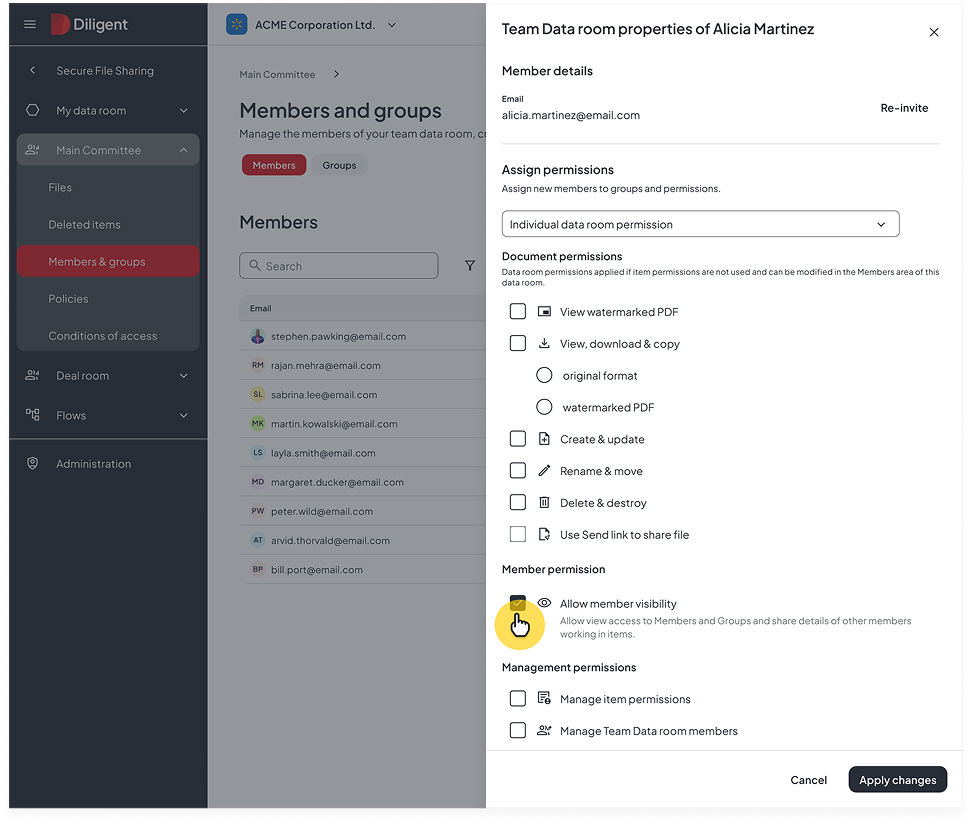 The new “Allow member visibility” permission
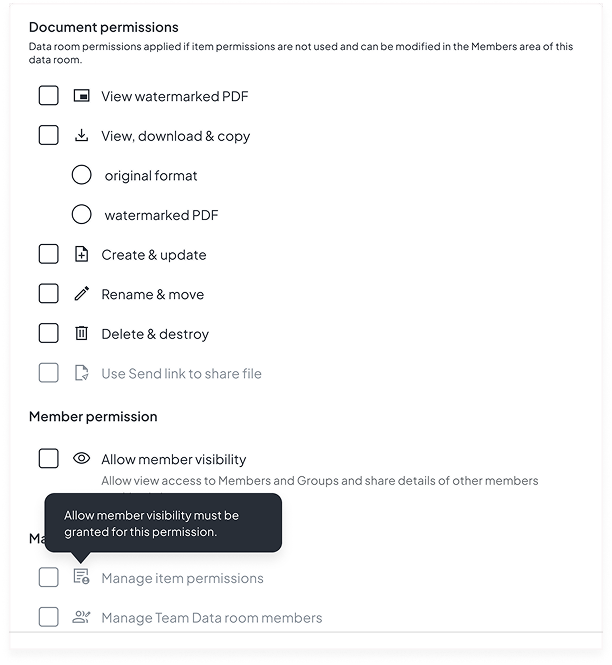 Visibility gates the permissions that depend on it
Ideally these controls would live in organisation settings for self-serve management; under the development constraints, that became a follow-up backlog item.
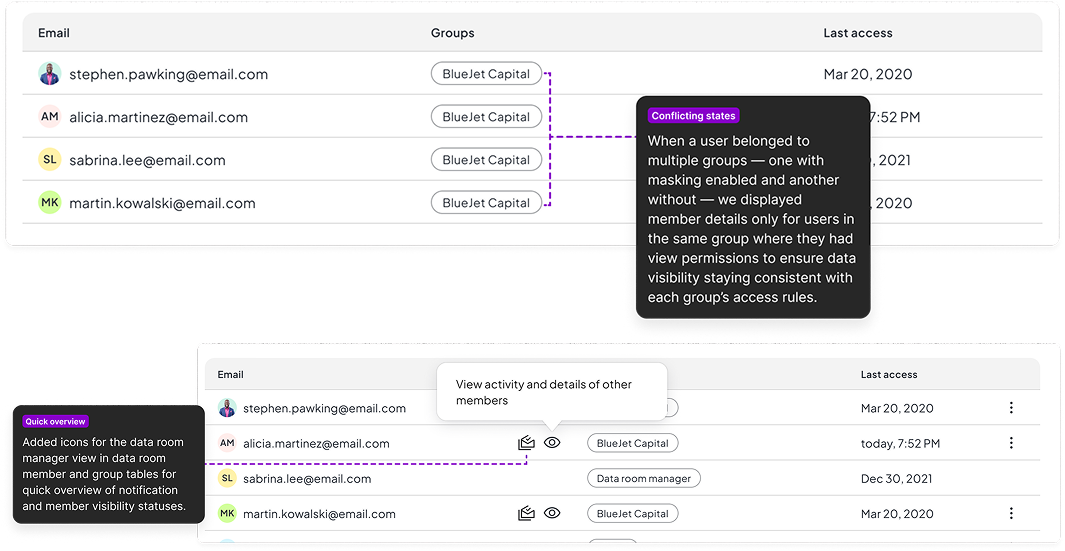 Overlapping group states & status icons
Communicating states, managing conflicts
Users often belong to multiple groups — some with masking on, some without. To keep views consistent, member details appear only within groups where the viewer holds “view” permission, so even in overlapping setups no one sees what they shouldn't — and admins can predict exactly what each role will experience.
The interface makes this legible: admins can preview permissions and verify masking before applying changes, and status icons in the member and group tables let Data Room Managers read notification and visibility state at a glance.
Masking activity while maintaining traceability
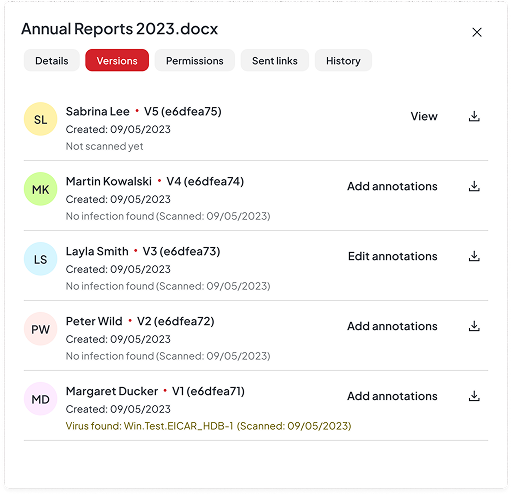
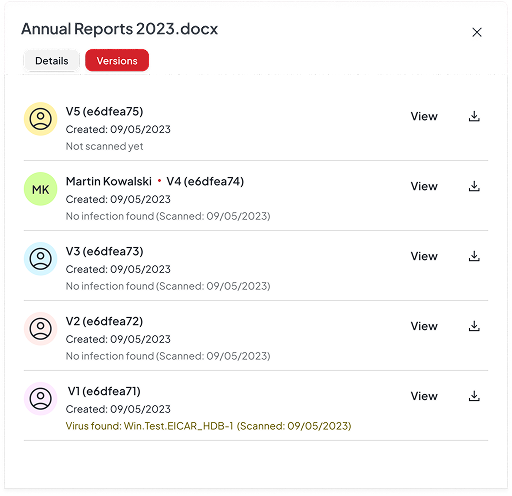
For masking to be effective, we removed user identifiers from every member-activity interface while keeping the data traceable — file and folder activity, version history, content views, and change-notification emails. The result: activity stays fully auditable, but individual identities are never exposed to the wrong party.
Demo sessions with the Client
I presented the concepts as interactive Figma prototypes across several demo sessions with the client, Product Manager, Account Manager, and Solution Engineer. With a tight timeline and no direct line to end users, these sessions were the fastest way to validate ideas, align on requirements, and minimise the risk of rework — and the client's active participation and openness to discussion helped us refine priorities and reach shared clarity early. This is stakeholder validation, not usability testing: it confirmed we were building the right things more than it proved the flows were usable, a distinction I kept visible in how much confidence we placed on each decision.
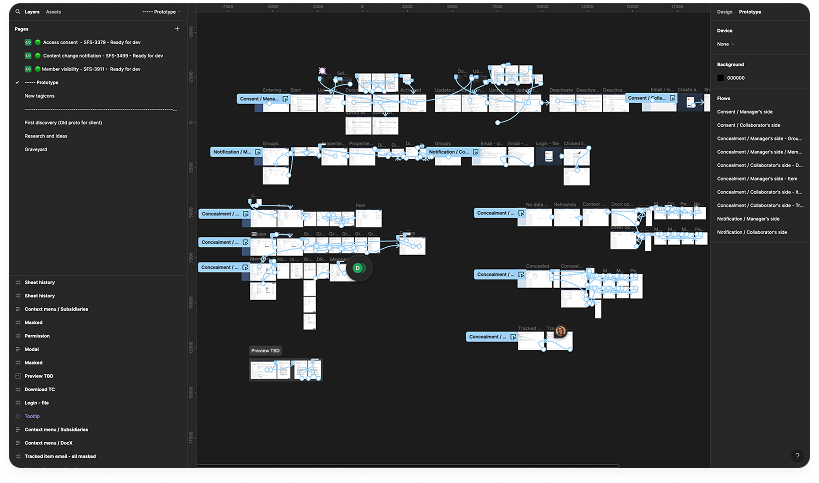 The interactive Figma prototype behind the demos
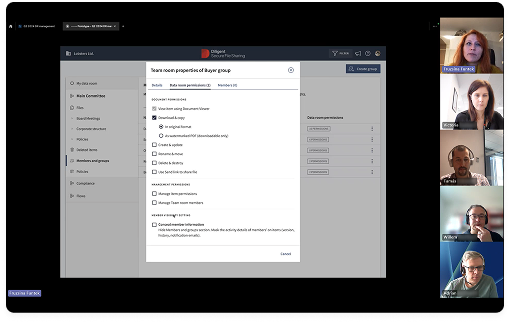 Prototype demo session with the client
Closed, won
All three capabilities shipped as one coherent system inside the roughly three-month window: a PDF-based legal access gate with preview and versioning, group-level update digests wired into the audit log, and a VDR mode that conceals participant identities while keeping every action traceable. Together they enabled a multi-thousand-dollar deal to close with the client.
The work also positioned SFS as a more premium, high-end offering — data-room controls Sales can package as a standalone proposition to support new enterprise sales engagements, rather than a one-off accommodation. And a beautiful thank-you note and flowers arrived from the Account Manager who closed the deal. :)
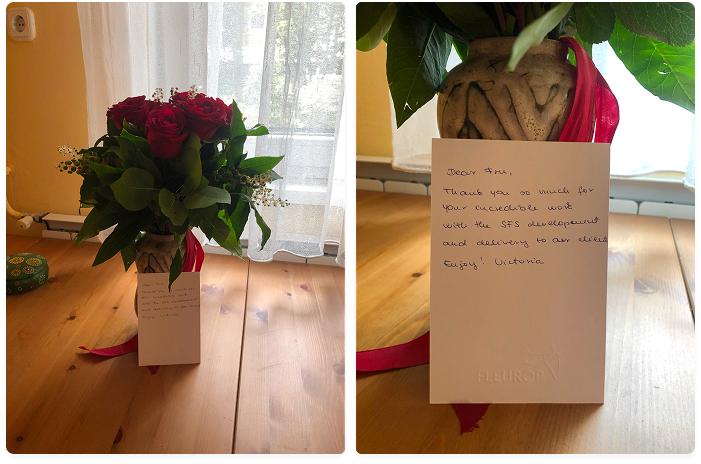 A thank-you from the Account Manager who closed the deal
What this project taught me
Being proactive in client communication
Client co-creation drove clarity, but communication was fragmented, with limited access to key users and slow feedback cycles. Once we began demoing the first concepts in Figma, alignment improved, but some key stakeholders often missed sessions, slowing validation.
When time is short, early and continuous alignment is a must have not a nice to have
Next time, I'd organize more workshops, especially early in discovery. Not doing so this time led to on-the-fly adjustments during design and implementation. Structured early sessions would have helped map flows, catch dependencies, address design conflicts, and collect questions more efficiently for client calls.